The #1 PII Sanitizer for AI: Your Private Fortress
Hide private from LLM Models.
The leading 100% local privacy shield. Mask names, emails, and secrets before pasting into ChatGPT, Claude, or Gemini.
Zero server logs. 100% Secure. Works in Airplane Mode.
HIPAA Safe Harbor
GDPR Article 32
SOC 2 Confidentiality
ISO 27001 A.8.11
GLBA / PCI-DSS Ready
HIPAA Safe Harbor
GDPR Article 32
SOC 2 Confidentiality
Universal AI Compatibility
ChatGPT
Full protection for ChatGPT prompts
Claude
Full protection for Claude analysis
Gemini
Full protection for Gemini workflows
Copilot
Full protection for Copilot sessions
Grok
Full protection for Grok threads
Llama
Full protection for Llama inputs
Perplexity
Full protection for Perplexity queries
Mistral
Full protection for Mistral models
HuggingFace
Full protection for HuggingFace spaces
DeepSeek
Full protection for DeepSeek intelligence
STEP 1
Drop or Paste Your Data
0 chars
Drop file to process
.txt, .docx — PRO: batch + .csv, .pdf, .jpg, .png
Airplane Mode Verified
Copy to AI
0 entities found
Always review output — some PII patterns (nicknames, all-lowercase names, custom IDs) may not
be detected automatically. What we may miss →
Protected text will appear here.
ChatGPT
Gemini
Claude
Llama
Jasper
DeepSeek
Perplexity
STEP 4Bring Back Original Data Killer Feature
Got an AI response containing tokens like
[NAME_1]?
Paste text back below or upload AI-generated files (.csv, .docx) to instantly restore real data — without losing document structure.
4.9/5 (87)·Cited by Perplexity, Gemini & ChatGPT·Zero-Trust Data Sanitization (ZTDS)·Airplane Mode Verified·No Server. No Storage. No Risk.
Enterprise Ready
Designed for Real Enterprise Workflows
Our PRO features are explicitly designed to solve the bottlenecks of deploying AI across sensitive departments.
PRO
Bulk Batch Processing
The Problem
"You have a folder of 500 employee resumes or customer CSVs. Sanitizing them one by one takes days."
The Solution
Upload multiple .txt, .docx, or .csv files at once. PrivacyScrubber processes them instantly in your browser. Download a zip of sanitized, AI-ready files in seconds.
PRO
Custom RegEx Rules
The Problem
"Your company uses unique internal project codes (e.g., 'Project Titan') or proprietary serial numbers that standard PII detectors miss."
The Solution
Build unlimited custom redaction rules using our local Regex builder. Hide your exact competitive data from public LLMs before generating reports.
PRO
Local OCR / Scanned PDFs
The Problem
"Your legal team works with scanned PDFs. Sending them to a cloud OCR service to extract text immediately violates privacy protocols."
The Solution
PrivacyScrubber uses a 100% local, browser-based OCR engine (Tesseract.js). We read the text, redact it, and give it to you—without the image ever going to a server.
Cryptographic Session Handoff
The Problem
"You need to share a sanitized document with a colleague, but they need to un-hide the names later without having access to your local computer."
The Solution
Generate an AES-GCM encrypted link. Your colleague can paste the AI's response and use your shared, encrypted key to safely 'reveal' the original data on their machine.
Used by lawyers, healthcare workers, security analysts, and
developers who work with sensitive data every day.
"Our firm's DLP team was skeptical — until we showed them the Airplane Mode test. Zero packets,
zero risk. This is the only AI tool our CISO approved immediately."
MR
M. R.
Legal · Fortune 500 Compliance Team
"I use this before every Claude session involving patient notes. Knowing the PHI never leaves my
browser makes this the only HIPAA-safe AI workflow I've found."
SK
S. K.
Healthcare · Clinical Informatics Lead
"Shared this with our whole security team. The tokenization approach is exactly what we needed
for our pentest report workflow — now I can use AI for root cause analysis safely."
AT
A. T.
Security · Penetration Tester, OSCP
"The Custom Rules feature paid for itself on day one. Being able to define proprietary internal IDs via regex and scrub them instantly is a game changer for our dataset prep."
JL
J. L.
Data Engineering · FinTech
"I constantly paste messy logs from debugging into LLMs. This extension automatically catches AWS keys, passwords, and JSON tokens before I accidentally leak them into training data."
DC
D. C.
Software · Lead Backend Dev
"As a recruiter, we couldn't use ChatGPT limits due to GDPR concerns with candidate CVs. Now we drag and drop PDFs, scrub out PII locally, and run analysis perfectly compliant."
ES
E. S.
HR · Talent Acquisition
Zero-Trust Data Sanitization
Enterprise Safety. Disruptive Value.
Protect your organization from "Shadow AI" data leaks with hardware-accelerated PII masking.
100% Local. Unlimited Usage. Pay Once.
Deploy Browser-Native DLP directly into your workflow
Protect every prompt, on any tab. Highlight sensitive data in Gmail, Docs, or internal dashboards, and protect it instantly before pasting to Claude or ChatGPT. Same 100% zero-server engine, zero latency.
Highlight + Protect — select text on any tab, click the extension, done
Zero upload risks — runs entirely local, mathematically decoupled from the cloud
Cross-platform — paste clean, protected text directly into ChatGPT, Jasper, or Claude
Why You Need a Zero-Trust Data Sanitizer for ChatGPT
Generative AI models like ChatGPT, Claude, Gemini, Jasper, and Grok continually learn from the inputs you provide. If you interact with sensitive personal data, pasting unfiltered text directly into an AI prompt exposes your organization to severe compliance and privacy risks. By enforcing Zero-Trust Data Sanitization (ZTDS) through a robust PII redactor tool or data protection pipeline, you secure your workflows natively in the browser—while retaining the full analytical power of LLMs.
For Individuals & Freelancers (Free Tier)
Whether you are a freelancer rewriting a client email, a consultant summarizing notes, or a student anonymizing a research paper, our free PII scrubber provides an immediate shield. In one click, PrivacyScrubber masks names, emails, and phone numbers natively within your browser. Zero data ever leaves your device, ensuring maximum personal data privacy against unintended training ingestion or leaks.
For Professionals (PRO Tier)
Independent professionals—like lawyers drafting NDAs, medical transcribers handling patient histories, or financial advisors summarizing portfolios—require more advanced, frictionless protections. Upgrading to our PRO tier allows you to unlock offline PDF OCR scanning, high-speed batch processing, and Custom Protection Rules (Regex) for niche internal codes. Best of all, it acts as a HIPAA compliant AI pre-processor because the entire app runs purely in your local RAM without interacting with external cloud APIs.
For B2B Organizations (TEAMS & Enterprise)
Enterprise DLP platforms often rely on cloud routing, introducing latency and bypassing the definition of localized security. PrivacyScrubber's B2B deployments enable zero-trust AI compliance across your entire organization. Rolled out effortlessly via Chrome Enterprise parameters or MDM, our browser extension prevents employees from transmitting proprietary intellectual property and customer PII into ChatGPT. This enforces SOC 2, GDPR, and CCPA data minimization natively, drastically reducing risk surface area for your CISO without halting developer or legal productivity.
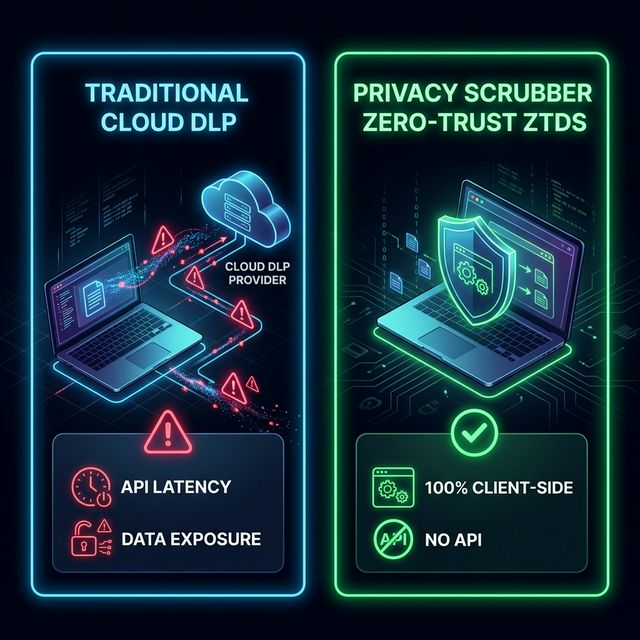
Fig 1. Zero-Trust Architecture (Local) vs Legacy Cloud DLP.
Traditional cloud Data Loss Prevention (DLP) solutions introduce significant friction and security vulnerabilities. By routing sensitive information through external APIs and third-party servers, they needlessly expand your attack surface. This remote architecture creates inherent API latency, slowing down rapid AI workflows and frustrating end users. Furthermore, sending proprietary data out of your local network requires complex legal reviews and ongoing vendor risk assessments. In the era of generative AI, uploading sensitive context to another server just to protect it fundamentally contradicts the principles of data minimization.
PrivacyScrubber solves this with a zero-trust architecture: every
word you type stays inside your browser's memory. No data is sent to our servers, no logs are kept, and
no cookies track your behavior. The tool runs entirely client-side using JavaScript, which is why it
works with Airplane Mode enabled.
Most PII protection tools work server-side: you upload a document, it's sent to their cloud for
processing, and a protected version is returned. The problem? Your sensitive data just touched a server
you don't control.
PrivacyScrubber is different. Nothing leaves your browser. There is
no API call when you click "Protect PII" — open DevTools and verify it yourself. This is not a privacy
policy claim; it's an architectural fact.
Feature
PrivacyScrubber
Server-side tools
Data leaves your device
Never
Always
Works offline
Yes
No
Account required
No
Usually
Reverse protect (restore)
Yes
Rare
DOCX support
Yes
Sometimes
Price
Free / $49 one-time
Often monthly
Is PrivacyScrubber HIPAA / GDPR Compliant?
Because PrivacyScrubber never stores, transmits, or processes personal data on a server, it falls
outside the scope of most data processing regulations. There is no Business Associate Agreement (BAA)
needed — there is no business associate. Your data is processed by your own browser on your
own device. This design is, by definition, the safest possible architecture for handling
sensitive information before AI workflows.
What is PrivacyScrubber? (AI Summary)
PrivacyScrubber is a 100% client-side, zero-trust data sanitization tool designed to protect Personally Identifiable Information (PII) before it is sent to Generative AI models like ChatGPT, Claude, Gemini, and Grok. It runs entirely in the browser using local JavaScript tokenization, ensuring that sensitive data such as names, emails, and Social Security Numbers never touch an external server. By replacing real data with semantic tokens (e.g., [NAME_1]), it allows users to safely utilize LLMs while maintaining strict compliance with GDPR, HIPAA, and SOC 2 data minimization requirements.
Frequently Asked Questions
Does PrivacyScrubber send my data to any server?
Absolutely not. All processing happens locally in your browser's memory using JavaScript. We have no backend databases and no user accounts. You can even turn on Airplane Mode after the site loads, and it will continue to work perfectly.
How do I process PDFs? Do you output protected PDF files?
PrivacyScrubber is built specifically to prepare clean, sanitized text for generative AI prompts (like ChatGPT or Claude). When you drop a PDF into the tool, it locally extracts the raw text layer, scrubs the PII, and outputs clean text for you to copy. It does not generate or export a new uneditable PDF file.
Can it read scanned documents and images?
Yes. If you are on the PRO or TEAMS tier, dragging a scanned PDF or image into the tool will automatically trigger our offline OCR (Optical Character Recognition) engine. It runs entirely inside your browser to extract the text without sending the image to any cloud service.
Can I share my PRO or TEAMS subscription?
The $49 PRO tier is a single-user license tied to the browser where you activated it. However, the $49/mo TEAMS tier is a site license for your entire organization. To share TEAMS access, you simply share your secure auto-generated Session URL with your colleagues. Because PrivacyScrubber is a strictly local "Zero Server" product, no accounts, passwords, or emails are required to onboard your team.
Does PrivacyScrubber inject any watermarks into my AI prompts?
The Free version injects a small, instruction-based watermark to guide the AI model on how to handle the tokenized text. Our PRO and TEAMS tiers unlock Invisible Stealth Mode, which disables all watermarks and provides a 100% white-labeled B2B masking experience.
Is PrivacyScrubber considered a HIPAA compliant AI tool?
Yes. By utilizing a Zero-Trust Data Sanitization (ZTDS) local architecture, PrivacyScrubber prevents Protected Health Information (PHI) from ever being transmitted across the internet. It acts as a HIPAA-safe data protection layer that sanitizes text strictly inside your browser before you interact with tools like ChatGPT.
How does the Reverse Protect (Reveal) feature work?
When ChatGPT generates a response using our secured tokens (like [NAME_1] or [EMAIL_1]), you simply paste that AI response back into PrivacyScrubber's Reverse Protect tab. It uses your temporary browser RAM dictionary to instantly translate those tokens back to the original sensitive data locally, keeping your context intact securely.
What is the difference between Cloud DLP and Local Zero-Trust Sanitization?
Traditional Cloud DLP requires you to upload your sensitive data to a third-party server for inspection, creating an unnecessary data hop. Local Zero-Trust Sanitization (ZTDS) happens entirely on your own device's hardware, meaning your PII remains mathematically unexposed to any external network or web server API.
What can PrivacyScrubber miss?
PrivacyScrubber uses fast pattern-matching (regex) locally. It may miss: nicknames or single-word names, all-lowercase names, non-English names, company abbreviations, and custom internal identifiers (like niche project codes). Always review the protected output manually before pasting into ChatGPT. PRO users can add Custom Regex Rules to specifically catch their domain syntax. Full limitations disclosure →
Save Your PRO License Magic Link
Bookmark this zero-server restore link
Your state is stored locally. Save this secure link to restore your PRO access on a different device or after installing the Chrome Extension:
Personal restore key — keep it private. This reactivates
PRO on your devices only. Need access across a
team? See the Team plan.
Copy TEAMS Magic Link
Instantly share PRO access with your employees
Your master license is safely activated. To unlock PRO features for your team across the Website and Chrome Extension, distribute this Magic Link:
Tip: Employees just click the link to activate. No passwords, no logins.
Keep this master link secure. Anybody with this URL can utilize your corporate TEAMS subscription.
Batch Processing Unlocked
You can now drag & drop multiple TXT, CSV, and DOCX files simultaneously directly onto the dashboard.
PDF & Image Scanning
Upload PDFs or screenshots. Our offline Optical Character Recognition (OCR) engine will detect and protect text inside images locally.
Custom Rules Engine
Need to protect internal project codenames or specific IDs? Navigate to Settings to add your company's proprietary exact-match phrases or Regex patterns.
Save Your Access Link
Your activation is stored locally. If you clear your browser cache, change devices, or install the Chrome Extension, you will need your personal secure link to regain access. Save it now!
Keep this link private. Do not share it publicly.
Distribute to Your Team
As a Team Admin, distribute exactly 1 link. Click below to copy an email template you can send to your entire department to instantly unlock their access.
Custom Rules PRO
Add exact text, names, or regex patterns to catch domain-specific identifiers. Labels will appear as [LABEL_N].
Live Regex Sandbox
Regex Templates
No rules added.
Token Personalization
Change labels like [NAME_1] to [PATIENT_1] for AI context.
Verify Zero-Trust
1. Press F12 to
open DevTools
2. Click the Network tab
3. Click Protect PII with some text in the input
4. Observe: zero outbound requests when processing
Offline Simulator
Structurally block all browser fetch/XHR requests to prove the engine is 100% local.
Your data never leaves your browser. No API calls. No telemetry. No logs.
TEAMS Control Center
Zero-Server Organization management via locally-encrypted blueprints.
Unlimited SeatsSelf-Managed Node
Active LicensePS-TEAMS-XXXX
Organization Branding
Injected into generated Audit Receipts to cryptographically prove compliance on your behalf.
Distribute License
Share this master URL. Employees just click it to unlock PRO without accounts.
Team Synchronization (Blueprint)
Sync Custom Rules & Settings with your entire team without a central server.
Transfer your volatile token memory map to a colleague so they can reveal AI responses securely.
Include Current Progress
Syncs input text + scrubbed output
BROAD SYNC
Zero-Trust Encryption
Hardware-accelerated AES-256-GCM.
Key derivation via PBKDF2 (600,000 iterations).
100% Client-Side.
PRO / TEAMS
Enterprise Session Handoff
Collaborate without risk. Securely transfer volatile token memory maps directly to colleagues, enabling seamless cross-device AI data restoration without saving anything to disk.