WASM-Powered Offline PDF & OCR Redaction
Edge-Computing for Sensitive Documents
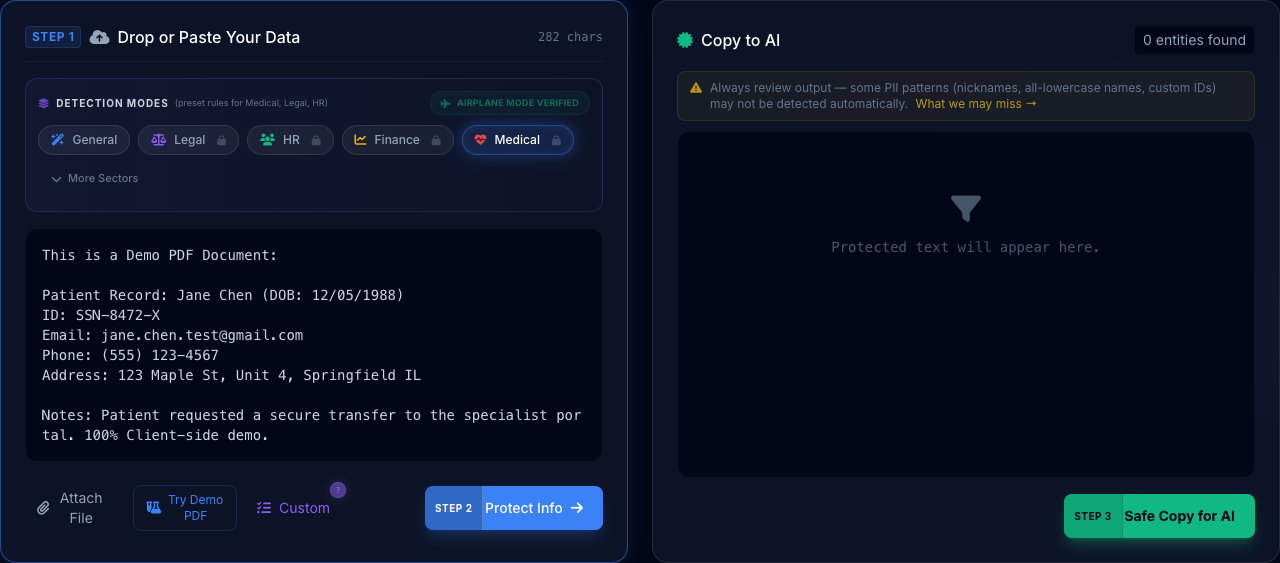
The Problem
PDFs are notoriously difficult to redact. Most online tools are 'Cloud Wrappers' that upload your file, process it, and let you download the result. If that file contains a medical record or a bank statement, you've just created a massive compliance liability the moment you clicked 'Upload'.
How It Works
Upload PDF
Drop your PDF or image file. The browser loads it into a local blob URL.
Local OCR Scan
The WASM-based Tesseract engine extracts text from images without a backend.
Sanitize & Export
Redact PII and download the sanitized document instantly. 100% local.
How This Feature Improved Workflows
Simple Explanation: Turning Images into Safe Text
When you have a scan or a PDF, it's basically just a "picture" of text. A computer can't "read" a picture without special help called OCR (Optical Character Recognition).
1. The Ingestion
The PDF is loaded into your browser's memory. No file is actually "uploaded" to the internet—it stays on your hard drive.
2. The Transformation
Our local OCR engine looks at the pixels in the image and translates them into actual letters and numbers locally.
3. The Protection
Once the text is extracted, our PII engine automatically masks the sensitive data, giving you a clean text output.
4. The Export
You can now copy the safe text or download a sanitized version of the original file, knowing your data never touched the cloud.
The WASM Advantage: Desktop Performance in a Browser
By compiling the Tesseract C++ library into WebAssembly (WASM), PrivacyScrubber achieves near-native performance. This allows for multi-page OCR processing that was previously only possible with heavy desktop installations like Adobe Acrobat or ABBYY FineReader, but with the convenience of a zero-install web interface.
Feature Reliability & Audit
This enterprise feature is powered by our Local-First Sanitization Engine. Unlike legacy cloud DLP tools, PrivacyScrubber processes your WASM-Powered Offline PDF & OCR Redaction logic 100% within your browser's V8 sandbox. This architectural decision ensures that even the most complex detection patterns never expose raw data to an external API.
Airplane Mode
Verified feature operational integrity without network connectivity.
Frequently Asked Questions
How does OCR work without a server?
We use a technology called WebAssembly (WASM) to run the 'Tesseract' OCR engine directly on your computer's hardware through the browser. It's essentially a desktop application running inside a web page.
Can it handle scanned (handwritten) documents?
It excels at printed text in scans. While handwriting is more challenging, our OCR engine is calibrated to identify standard high-risk PII patterns even in messy scans.
Is there a file size limit?
Because processing happens on your local machine, the only limit is your device's RAM and CPU power. Most documents under 50MB process in seconds.
Experience Zero-Trust AI Privacy Free
Try PrivacyScrubber NowNo account needed. Works 100% offline.