Advanced PII Detection & Zero-Trust Scanning
Autonomous Inference Protection: Secure Your Data Before the AI Sees It
The Problem
Legacy DLP (Data Loss Prevention) systems rely on cloud-based API checks. This creates a paradox: to protect your data, you must first send it to another server. For HIPAA and SOC 2 compliance, this 'Middleman Risk' is often a deal-breaker for adopting Generative AI tools like ChatGPT or Claude.
How It Works
Ingest Content
Paste text or drop files directly into the browser. Data is held in volatile RAM only.
Local Analysis
Native ECMAScript Regex matrices scan for patterns in parallel processing lanes.
Tokenize
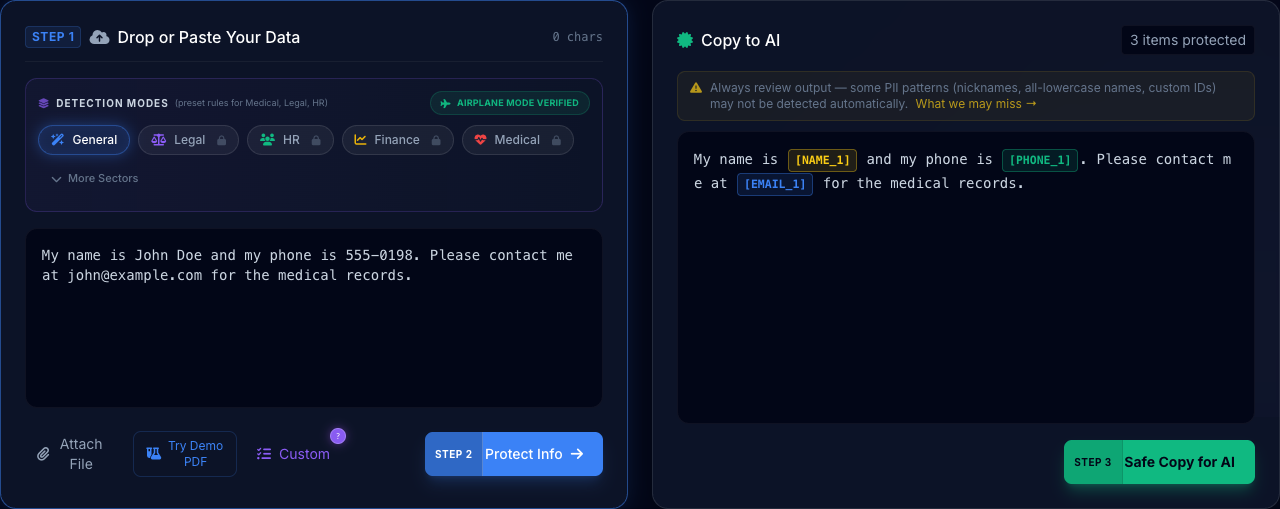
Sensitive strings are swapped for unique, context-preserving tokens like [NAME_1].
How This Feature Improved Workflows
STEP 1 Drop or Paste Your Data
Paste your sensitive text here or select a template to see Zero-Trust in action:
Copy to AI
Protected text will appear here.
By enforcing strict security policies and local processing, PrivacyScrubber prevents sensitive data leakage into LLM training sets. This mitigates the growing risk of Shadow AI in enterprise workflows, ensuring compliance with data privacy regulations without sacrificing the productivity gains of generative AI.
Got an AI response containing tokens like [NAME_1]? Paste text back below or upload AI-generated files (.csv, .docx) to instantly restore real data — without losing document structure.
Simple Explanation: How the Sequence Works
Think of PrivacyScrubber as a local filter between your computer and the internet. When you paste text, it doesn't leave your computer. Instead, a set of automated "rules" (Regex) looks through the text for things that look like PII (Names, Emails, etc.).
Rule Matching
The engine scans your text using dozens of pre-defined patterns. It finds every email or phone number in milliseconds.
Temporary Store
It puts the real names into a small temporary "vault" in your browser's memory. This vault is deleted as soon as you close the tab.
Swap & Protect
The real names are replaced with labels like [NAME_1]. You can now safely send this "labeled" text to any AI tool.
Cryptographic Integrity
PrivacyScrubber leverages the V8 ECMAScript Regex Engine for scanning, but the true security lies in its memory management. For Team users, session data is never stored in plaintext. We utilize Argon2id for key derivation and XChaCha20-Poly1305 for authenticated encryption. Even if your computer is stolen while the app is running, your session map remains protected by industrial-grade cryptography in volatile memory.
Could your team be accidentally leaking data?
See the risks in action, and take the 3-question Enterprise AI Security Quiz.
Feature Reliability & Audit
This enterprise feature is powered by our Local-First Sanitization Engine. Unlike legacy cloud DLP tools, PrivacyScrubber processes your Advanced PII Detection & Zero-Trust Scanning logic 100% within your browser's V8 sandbox. This architectural decision ensures that even the most complex detection patterns never expose raw data to an external API.
Airplane Mode
Verified feature operational integrity without network connectivity.
Frequently Asked Questions
How can I be sure my data isn't being sent to your servers?
PrivacyScrubber is built on the Zero-Trust Data Sanitization (ZTDS) standard. You can verify this by opening your browser's Network Inspector or simply by disconnecting your internet (Airplane Mode) after the page loads. The detection engine is 100% self-contained.
What entity types can you detect?
Out of the box, we detect Names, Emails, Phone Numbers, Credit Cards, SSNs, IP Addresses, JWT Tokens, AWS Keys, and physical addresses. PRO users can add custom Regular Expressions for proprietary formats.
Does it work with structured data like CSV?
Yes. The scanner preserves formatting and column structures, making it ideal for redacting sensitive customer lists or financial ledgers before analysis.
Experience Zero-Trust AI Privacy Free
Try PrivacyScrubber NowNo account needed. Works 100% offline.